
Running Magento 2 on AWS ECS: A Production-Ready Terraform Setup
EaseCloud's open-source Terraform module deploys Magento 2 on AWS ECS with Aurora MySQL, OpenSearch, and CloudFront, an alternative to EC2 hosting.
Introduction
Most guides to hosting Magento 2 on AWS assume a single EC2 instance or a basic auto-scaling group. magento2-aws-ecs-terraform is an open-source Terraform module from EaseCloud that takes a different approach: a fully containerized architecture on Amazon ECS, built for stores that need to scale and ship releases without downtime.
Architecture Overview
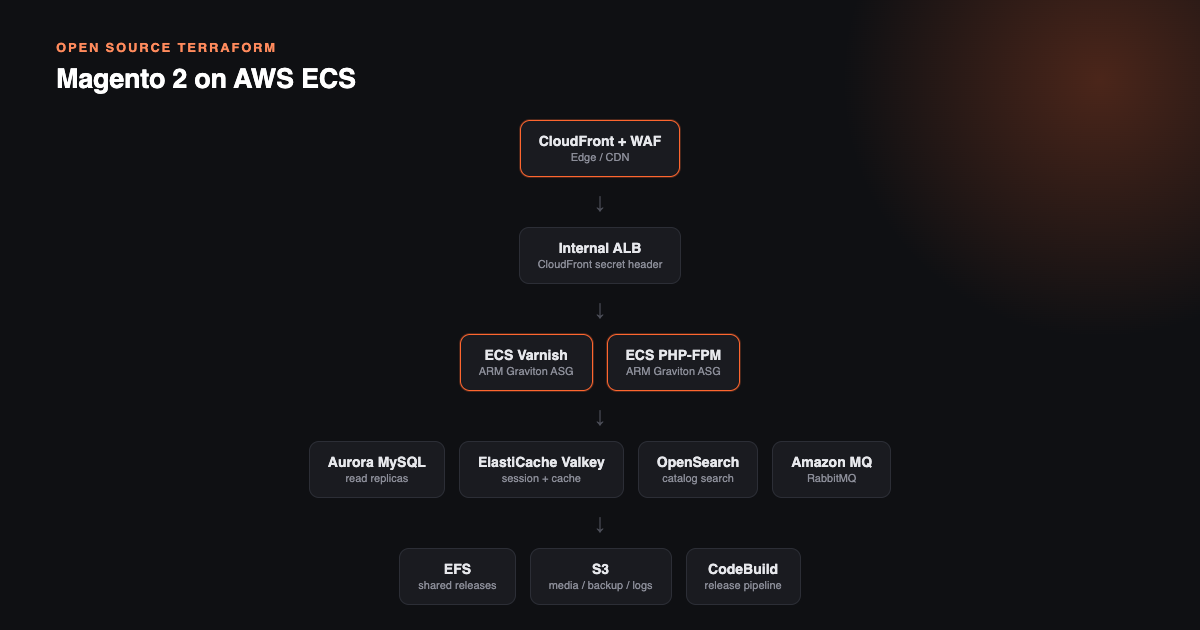
The module provisions:
- ECS EC2 clusters running on ARM Graviton instances, split into separate Varnish and PHP-FPM backend tiers, mixing On-Demand and Spot capacity
- Aurora MySQL 8.0 with read replica autoscaling and Performance Insights enabled
- ElastiCache Valkey - two separate clusters for sessions and cache, both with TLS and encryption at rest
- OpenSearch for Magento catalog search
- Amazon MQ (RabbitMQ) for async queue processing
- imgproxy running as an ARM64 Lambda container behind CloudFront, so product images get resized and optimized on the fly instead of at upload time
- CloudFront with a WAF ACL - IP lists, geo-blocking, rate limiting, and AWS managed rule sets in front of everything
- An internal ALB with a CloudFront secret header, so the origin only accepts traffic that actually came through CloudFront
- EFS with three access points (public read-only, shared writable, and releases) for shared release storage across containers
- Four S3 buckets for media, releases, backups, and logs
Shipping Releases Without Downtime
New releases go out through a CodeBuild pipeline: you upload a release archive to the releases S3 bucket, an EventBridge rule triggers an SSM Automation document, CodeBuild extracts it to EFS, and a symlink switch points the running containers at the new release. Code-only releases don't require building or deploying a new container image.
Cost
A single-AZ developer setup with t4g instance types runs approximately $300-450/month, mostly driven by Aurora, OpenSearch, and Amazon MQ. A Multi-AZ production setup with larger instances and multiple read replicas runs approximately $600-900/month before Reserved Instance discounts. The module also swaps the usual managed NAT Gateway for a t4g.nano NAT instance, which costs about $0.50/month per availability zone instead of roughly $32/month.
Getting Started
git clone https://github.com/easecloudio/magento2-aws-ecs-terraform.git
cd magento2-aws-ecs-terraform
# edit brand, domain, and email in developer.config.yaml
terraform init -backend-config=state.config
terraform workspace new developer
terraform plan -out developer.plan
terraform apply developer.plan
Configuration lives in a single YAML file per environment (developer.config.yaml, staging.config.yaml, production.config.yaml) instead of Terraform variable files, so switching environments means switching the Terraform workspace, not editing a pile of .tfvars files.
ECS or EC2?
Our guide to deploying Magento 2 on AWS covers a more traditional EC2 auto-scaling setup. ECS is worth the extra setup if you want container-level isolation between the Varnish and backend tiers, a release pipeline that doesn't require rebuilding images for every deploy, or you're already running other workloads on ECS and want Magento to fit the same operational model.
If you'd rather have this managed for you instead of running Terraform yourself, that's what our Adobe Commerce cloud hosting service covers.